Print to Different Trays in NAV – Part 1
This post is part of a series where I explain how to print to different trays in NAV
- Print to different trays in NAV – Part 1
- Print to different trays in NAV – Part 2
- Print to different trays in NAV – Part 3
- Print to different trays in NAV – Part 4
In this first part, we’ll quickly talk about options available in NAV that allow printing to different trays.
First, let’s check properties of report “Sales – Invoice” (ID 206):
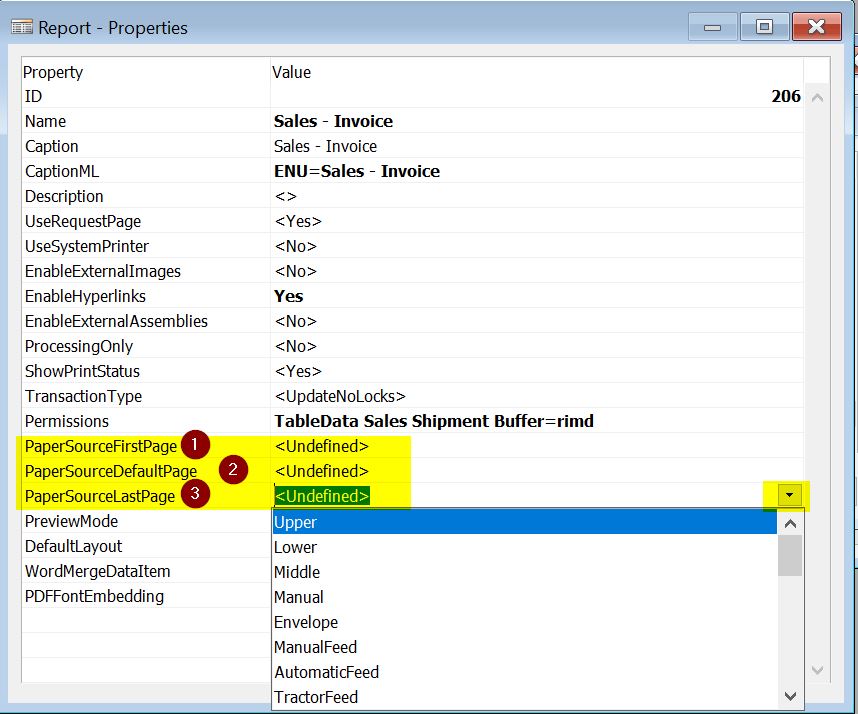
As you can see, there are three properties that let you select the tray where the page should print. Here’s the official help from MSDN:
Available values for each property are described here: Paper Sources and Tray Numbers (this link refers to Norway Local Functionality, but it explains all available tray numbers in any NAV database).
Note: In NAV 2009 R2 and older versions, the available options are PaperSourceFirstPage and PaperSourceOtherPages.
In the next blog, I’ll explain how you can try these options without having a printer with different trays.
Related: Text encoding in NAV 2009 R2 Classic Client – Part 2
Print to different trays in NAV – Part 2
Print to different trays in NAV – Part 3
Print to different trays in NAV – Part 4
Have questions or suggestions? Reach out via LinkedIn or Twitter.