
Text Encoding in NAV 2009 R2 Classic Client – Part 1
P.S: If you’re still using Microsoft Dynamics NAV 2009 R2 Classic Client or a previous version, you’ll want to keep reading!
We all know that Microsoft Dynamics NAV 2009 R2 Classic Client supports ANSI only (code page 1252 or depends on your Windows localization).
To import/export encoded files, we usually use workarounds. When you search online, you’ll find two main answers:
- Ansi-Ascii converter: but you need to add new characters in the codeunit as they come up
- Use some third-party tools: but this creates dependencies and maintenance headaches
My Preferred Solution: Microsoft ActiveX Data Objects 2.8 Library
This DLL is available on every Windows machine and offers a useful object: Stream.
To use it, you need to:
- Know your text file encoding
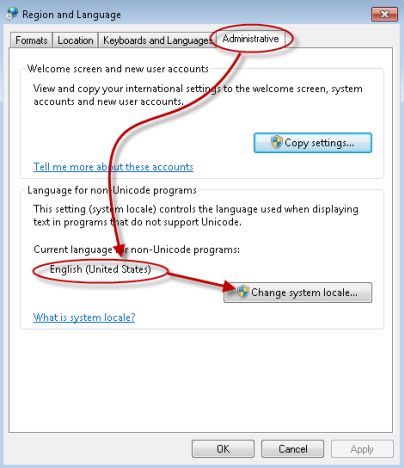
- Check that your OS supports the needed language
- Use a simple code in your NAV:
CREATE(Stream);
Stream.Open;
Stream.Charset(_Charset);
Stream.LoadFromFile(_Path);
Line := Stream.ReadText(1024);
Stream.Close;
Example: Russian Windows Server
Change your Windows language to Russian, then use two Russian text files with different encodings: UTF-8 and IBM855 (OEM 855). Test on a NAV 2009 R2 Russian Native Demo Database.
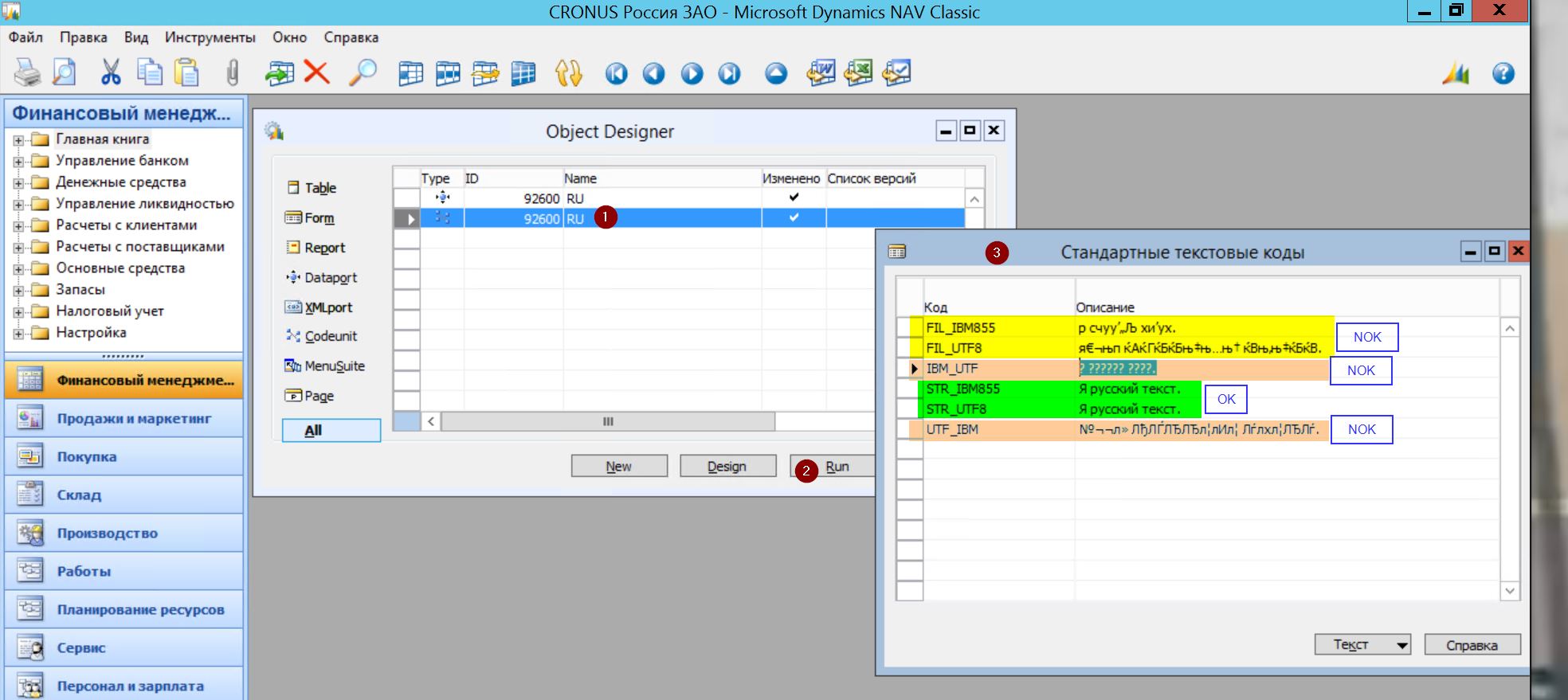
Results Table
| Code | Comment |
|---|---|
| FIL_IBM855 | Read a IBM855 encoded file with File variable |
| FIL_UTF8 | Read a UTF-8 encoded file with File variable |
| IBM_UTF | Read a IBM855 encoded file with Stream automation, wrong Charset = UTF-8 |
| STR_IBM855 | Read a IBM855 encoded file with Stream automation, correct Charset = IBM855 |
| STR_UTF8 | Read a UTF-8 encoded file with Stream automation, correct Charset = UTF-8 |
| UTF_IBM | Read a UTF-8 encoded file with Stream automation, wrong Charset = IBM855 |
You can download the objects and files used in these examples here.
Related: Text encoding in NAV 2009 R2 Classic Client – Part 2
How to: Set Up Multiple Web Server Instances for the Microsoft Dynamics NAV Web Client – Part 2
Dynamics NAV Web Client: Filters & FlowFilters on pages
Have questions or suggestions? Reach out via LinkedIn or Twitter.