Drop Shipments vs Special Orders in Business Central: Implementation Analysis & Best Practices
Introduction
Business Central offers two distinct approaches for handling nonstock items: drop shipments and special orders. While both processes serve similar purposes, they differ significantly in execution and configuration.
Drop shipments enable vendors to ship directly to customers, bypassing your warehouse entirely. This approach is ideal when you want to fulfill customer orders without the overhead of inventory handling while maintaining transaction visibility for cost of goods sold calculations.
Special orders, conversely, route items through your warehouse before reaching the customer. This method suits scenarios where you need quality control, bundling with regular inventory items, or maintaining consistent customer interfaces across all order types.
Despite comprehensive documentation available in Microsoft Learn, subtle implementation inconsistencies between these processes can create confusion for Business Central practitioners. This analysis examines these differences and proposes improvements for enhanced workflow consistency.
Essential Documentation References
Before diving into the analysis, familiarize yourself with Microsoft’s official documentation:
Key Differences: Drop Shipments vs Special Orders
While both processes handle nonstock items, their implementation reveals several critical differences that impact user experience and system consistency.
 Sales order line configuration showing field availability differences between drop shipments and special orders
Process Comparison Matrix
The following table highlights key implementation differences:
| Aspect | Drop Shipments | Special Orders |
|---|---|---|
| Drop Shipment Field (Editable?) | Yes (*) | N/A |
| Special Order Field (Editable?) | N/A | No |
| Purchasing Code Field (Required?) | No (*) | Yes |
| Direct Purchase Order Creation | Yes | No (*) |
| Requisition Worksheet Creation | Yes | Yes |
Note: Asterisks (*) indicate implementation inconsistencies that will be analyzed below.
Understanding Purchasing Codes
The Purchasing Code table serves as the configuration backbone for managing special orders, drop shipments, and standard procurement processes. This centralized approach should theoretically provide consistent behavior across all order types.
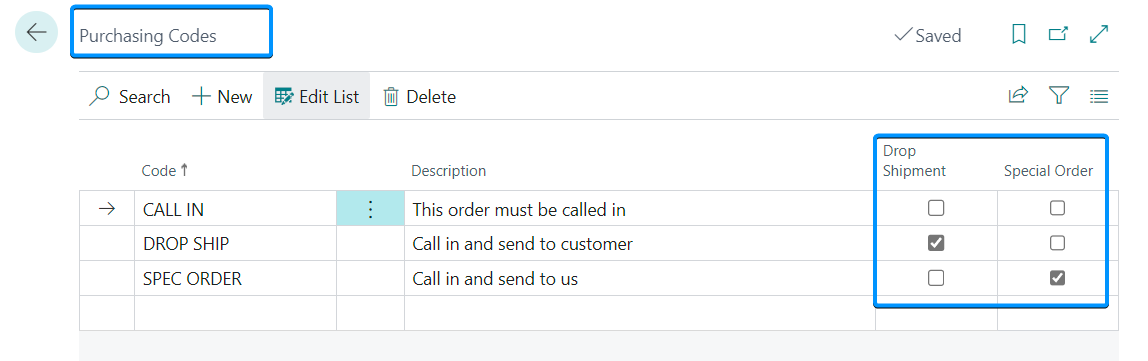 Purchasing Codes table configuration showing drop shipment and special order settings
The Configuration Paradox
A critical observation emerges when examining the Purchasing Code table: Why is the Drop Shipment field editable while the Special Order field is not? This inconsistency raises important questions about the intended design philosophy and creates confusion in implementation.
This discrepancy prompted this analysis, as it reveals fundamental inconsistencies in how Business Central handles these seemingly similar processes.
Implementation Analysis: Historical Context vs Current State
Legacy Behavior vs Modern Implementation
The Microsoft Dynamics NAV 2009 Trade manual provides valuable insight into the original design intent:
NAV 2009 Drop Shipment Process:
- Navigate to Sales & Marketing → Order Processing → Sales Orders
- Create a new sales order
- Enter customer information (e.g., customer 10000)
- Add Purchasing Code and Nonstock fields to the line view
- Select Item type on the Lines FastTab
- Access Actions → Functions → Nonstock Items
- Select the desired item (e.g., item 3100)
- Crucial step: Enter DROP SHIP in the Purchasing Code field
The Documentation Gap
Current Business Central documentation omits the Purchasing Code field’s role in drop shipment processes entirely. This represents a significant departure from the original NAV implementation, where Purchasing Codes provided consistent control over both drop shipments and special orders.
Key Inconsistencies Identified:
- Field Usage Disparity: Special orders require Purchasing Codes, drop shipments do not
- Documentation Disconnect: Legacy procedures emphasize Purchasing Codes for drop shipments; current docs ignore them
- User Interface Inconsistency: Drop Shipment field remains editable, creating potential user errors
Purchase Order Creation Limitations
Another significant limitation affects special orders: direct purchase order creation is only available for drop shipments.
For special orders, users must rely on the requisition worksheet, which introduces additional complexity. The current workaround—leaving the Location Code empty—forces the system to default to the company’s address, but this solution fails when warehouse addresses differ from company addresses.
Proposed Improvements for Enhanced Consistency
Based on this analysis, the following improvements would significantly enhance Business Central’s procurement workflow consistency:
1. Documentation Enhancement
Current Gap: Drop shipment procedures omit Purchasing Code usage Proposed Solution: Update official documentation to include Purchasing Code configuration for drop shipments, aligning with special order procedures
2. Field Behavior Standardization
Current Issue: Drop Shipment field remains manually editable Proposed Solution: Make the Drop Shipment field non-editable, controlled exclusively through Purchasing Code configuration
3. Purchase Order Creation Parity
Current Limitation: Special orders cannot create purchase orders directly Proposed Solution: Enable direct purchase order creation for special orders with proper address handling for multiple warehouse scenarios
Improved Process Matrix
The following table represents the proposed consistent implementation:
| Aspect | Drop Shipments | Special Orders |
|---|---|---|
| Drop Shipment Field (Editable?) | No | N/A |
| Special Order Field (Editable?) | N/A | No |
| Purchasing Code Field (Required?) | Yes | Yes |
| Direct Purchase Order Creation | Yes | Yes |
| Requisition Worksheet Creation | Yes | Yes |
Business Impact and Benefits
Implementing these improvements would deliver several key benefits:
For System Administrators:
- Reduced configuration complexity
- Consistent field behavior across processes
- Improved user training efficiency
For End Users:
- Clearer process distinction
- Reduced manual errors
- Streamlined workflow experience
For Developers:
- Consistent API behavior
- Simplified customization requirements
- Predictable field interactions
Conclusion and Call to Action
This analysis aims to foster community discussion about Business Central’s procurement process consistency. The identified inconsistencies represent opportunities for improvement rather than fundamental flaws.
The vision is clear: A unified, consistent approach to handling both drop shipments and special orders would significantly benefit the Business Central community by:
- Enhancing workflow comprehension
- Simplifying application configuration
- Reducing implementation complexity
- Improving user experience consistency
Community Engagement
Have you encountered similar inconsistencies in your Business Central implementations? Share your experiences and perspectives:
Discussion Points:
- How do these inconsistencies impact your daily operations?
- What workarounds have you developed?
- Which proposed improvements would provide the most value?
- Are there additional process improvements you’d recommend?
Next Steps
Consider implementing these practices in your current environment:
- Standardize on Purchasing Codes for both processes where possible
- Document your organization’s approach to handle these inconsistencies
- Train users on the current limitations and workarounds
- Provide feedback to Microsoft through appropriate channels
By working together as a community, we can drive improvements that benefit all Business Central practitioners.
References:
[1] Microsoft Dynamics NAV 2009 Trade Manual, Chapter 3
Have questions or suggestions? Feel free to reach out via LinkedIn or Twitter.